Practical
Activities.
A range of hands-on activities, each one helping my understanding of product analysis through primitive and simplified shapes, objects, and transitions.
Wire Practice
Creating wire sculptures is one of the weak points within my design skill set, however I did improve whilst undertaking challenges to create joints between wire strands. I developed three types of wire joints that I will further use in the activity below.
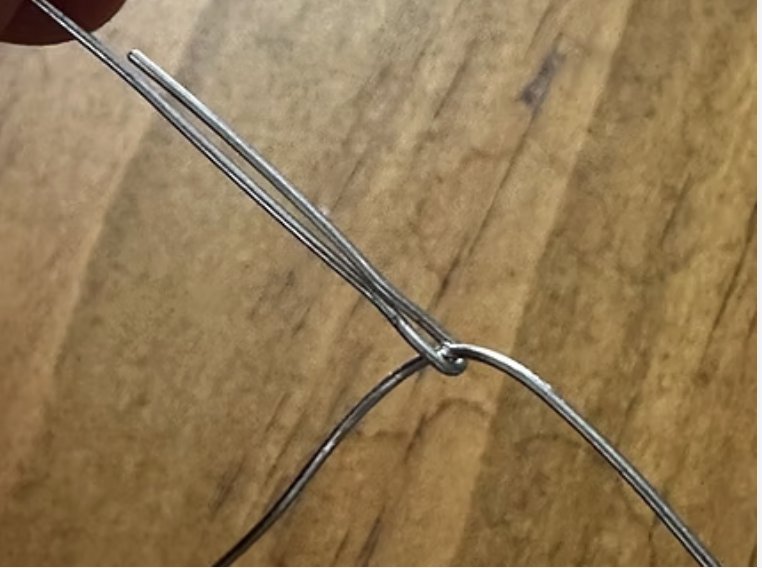
A simple twist joint where two lengths of wire are simultaneously twisted to form a spiral bond. This is one of the easier joints to perform however it was tricky once I had to hold a 3D form and move its whole body rather than one length of wire.
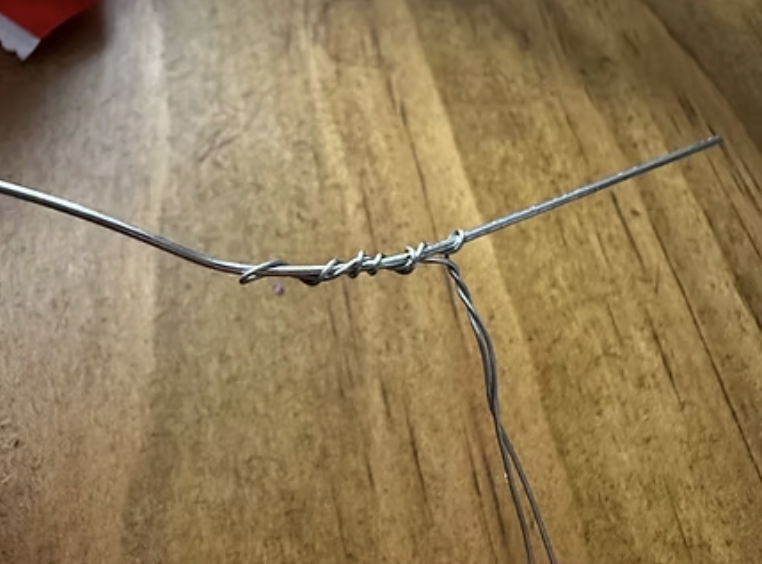
This linkage was helpful if I needed a quick and minimal way to join a wire to the centre of a line. It was done by using pliers to crimp down, forcing the loop to clamp and hold itself to the line.
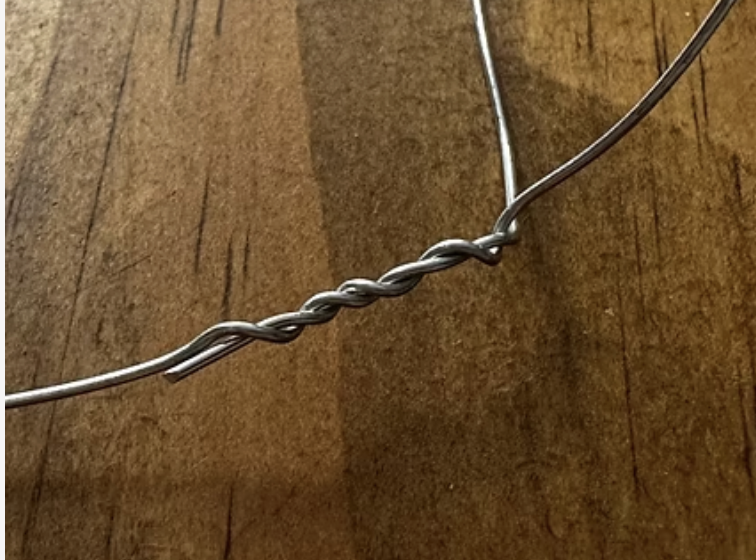
This joint is a combination of the twist and clamp joints, however using thin wire to join to a thick wire line. This one was most simple as thin wire was easy to twist around the thicker wire.
Shape Transitions
I was tasked to choose three unique shapes and apply my knowledge of transitions seen in objects to these three shapes to create a sculpture. The three shapes chosen are below. For the base of the sculpture is shape B, on the top left is shape A, and on the right is shape C.
The left side transition connects B and A, utilising the most common transition between two circular faces, a cylinder. Along the top is a common transition within human anatomy, that being a webbing, like between fingers. I utilised this transition because its effective to connect two points in a 3D space using a simple parabolic line. Last, the transition on the right is a combination between a line and a concave form. The base starts of using two lines that merge at the top, joining two points to one, this also leaves a concave volume on the underside of the sculpture.
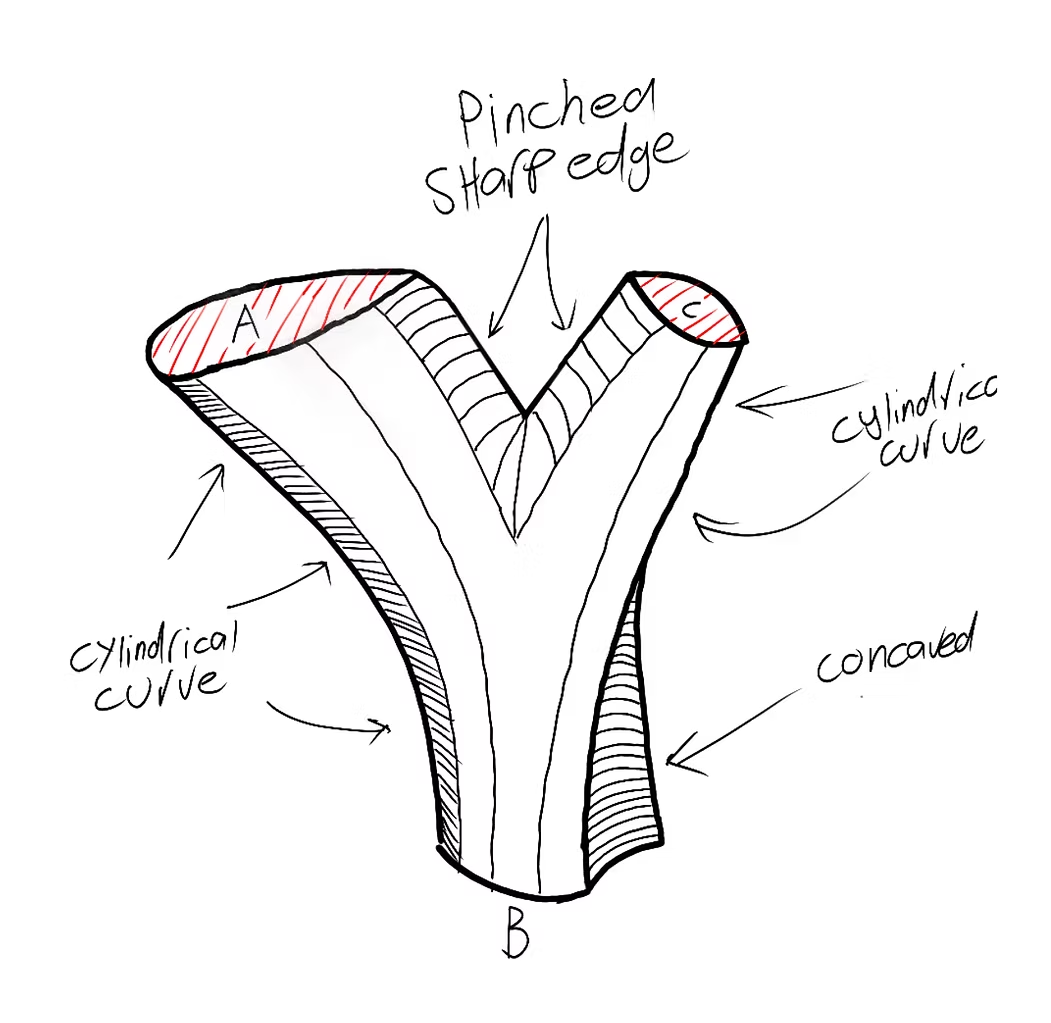
- Webbed Transition — seen between fingers on human anatomy, flows with a singular linear curve even in 3D form, connects two individual points effectively while also seamlessly transitioning to a 3D body.
- Cylindrical Transition — most common use for connecting two circular faces, seen most commonly on drink bottles.
- Concave / Linear Transition — custom transition produced by myself, shows how concave surfaces form inside of design due to transitions, connects two points to one using two merging linear curves, one of the stronger and unique transitions in the sculpture.
The sketch was my best attempt of putting my brain ideation to product. Although it lacks visualisation from multiple angles, I feel that with my linework to convey the convex and concave surfaces and the annotation to highlight transitions, it's the easiest way to understand the model.
Model Comparisons
The same sculpture was produced in three different materials to compare how each medium conveys form, volume and transitions.
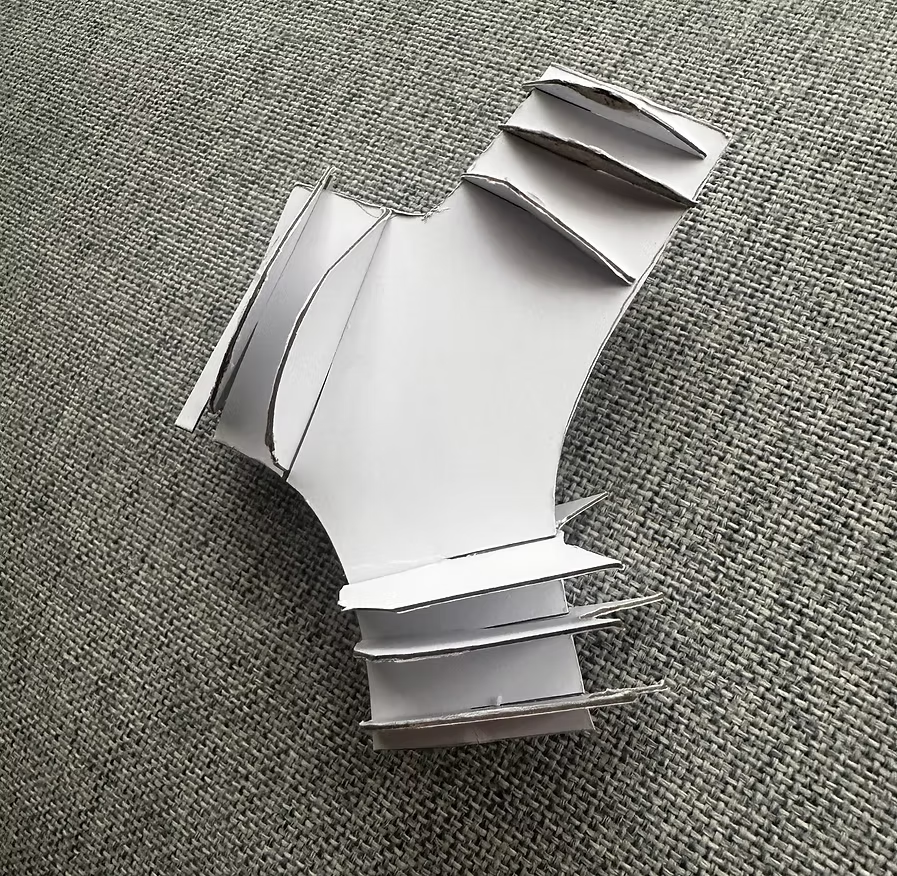
The paper transition is the best visual way to see what each face looks like as they are the most accurate representation to the initial reference.
However this model is lacking volume, especially in the middle where there are no parallel planes.
However this paper model does show a strong 2D view of the front on volumetric shape.
Furthermore, the viewer has to mostly interpret the transition themselves, due to the lack of connection between planes. However, paired with the other models, the viewer can quickly fill in the blanks, hence this model is best for displaying the faces and not the transition.
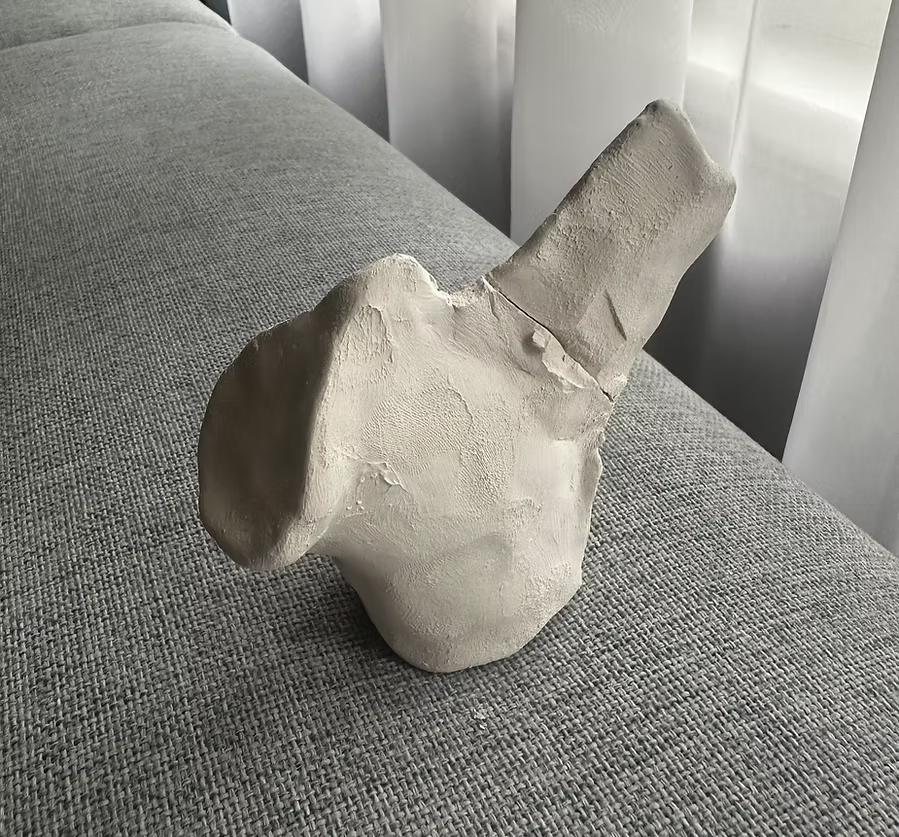
The clay transition is the best model I produced, as it truly highlights volume, form, and what each transition truly looks like in a 3D space.
The struggles with using clay is the lack of precision when creating the faces A, B, and C. Due to this error, the faces are not perfectly 1:1 scale with the original references.
This error is not crucial though as the viewer can still understand what each shape looks like and how they volumetrically transition between one-another.
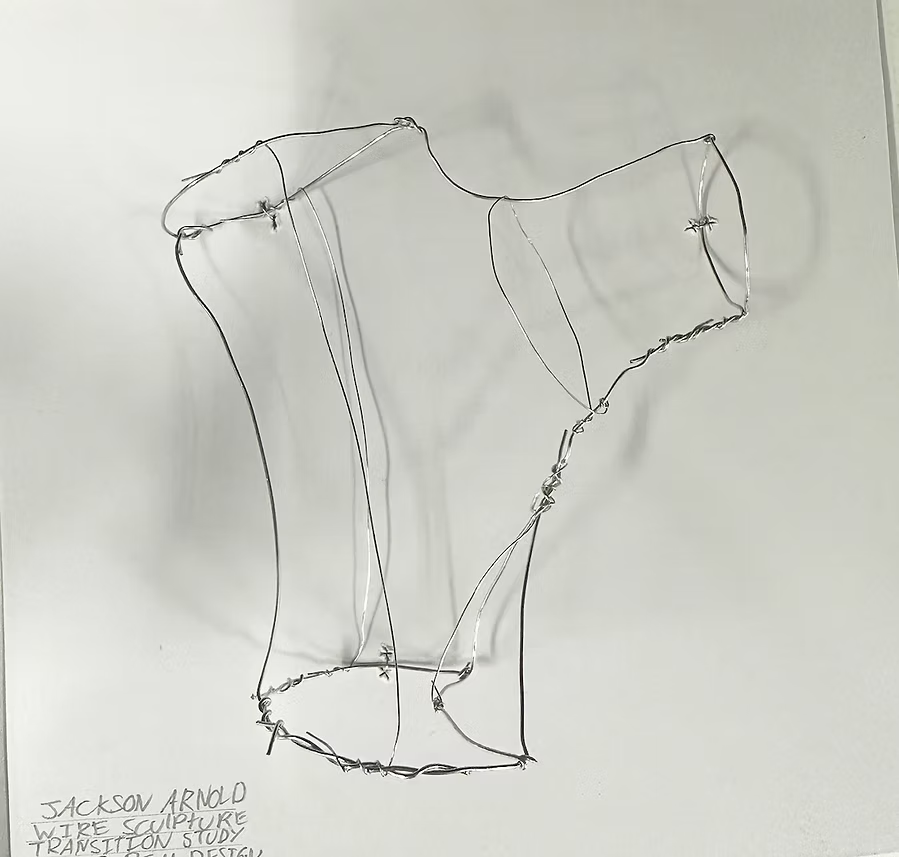
Wire is the best way to see the lines that make up transitions, especially on the webbed transitions that utilise 2D lines as the transition.
However wire is hard to convey thickness and volume due to the lack of 3D form from only using 2D lines. Like the paper model, wire was a great way to perfectly replicate the shape references.
Overall, I found wire the hardest module to complete out of the three as I struggled with molding the wire, joining components and not accidentally bending parts I don't want to bend. The way I overcame this struggle is making parts individually and modeling them together after.
When analysing the principles of this wire form, movement between shapes is very evident as the lines convey passages that link and transition together.
Plane Study
Using a series of 6 objects of my choice, I dissected them down to how they could be made up only using parallel planes.
I chose to use the mouse as my feature product throughout the study, hence I took my planes sketch and constructed it in 3D using only 2D planes and no glue. I found it interesting on how objects can be dissected into planes, it truly helps myself realise how silhouettes have a big impact on our interpretation of an object. In a world with no colour, silhouettes are the only way to distinguish a product, and by partaking this activity i was able to realise that the mouse has such a distinctive side profile, and is further highlighted with the most simple semi-circle scroll wheel.
I found it most challenging when building the model in 3D, that each plane point had to intersect at the perfect X, Y, and Z axis. If this didn't happen, the model would not have a perfect representation of its form and there would be an uneven symmetry and lack of smooth movement within the model.
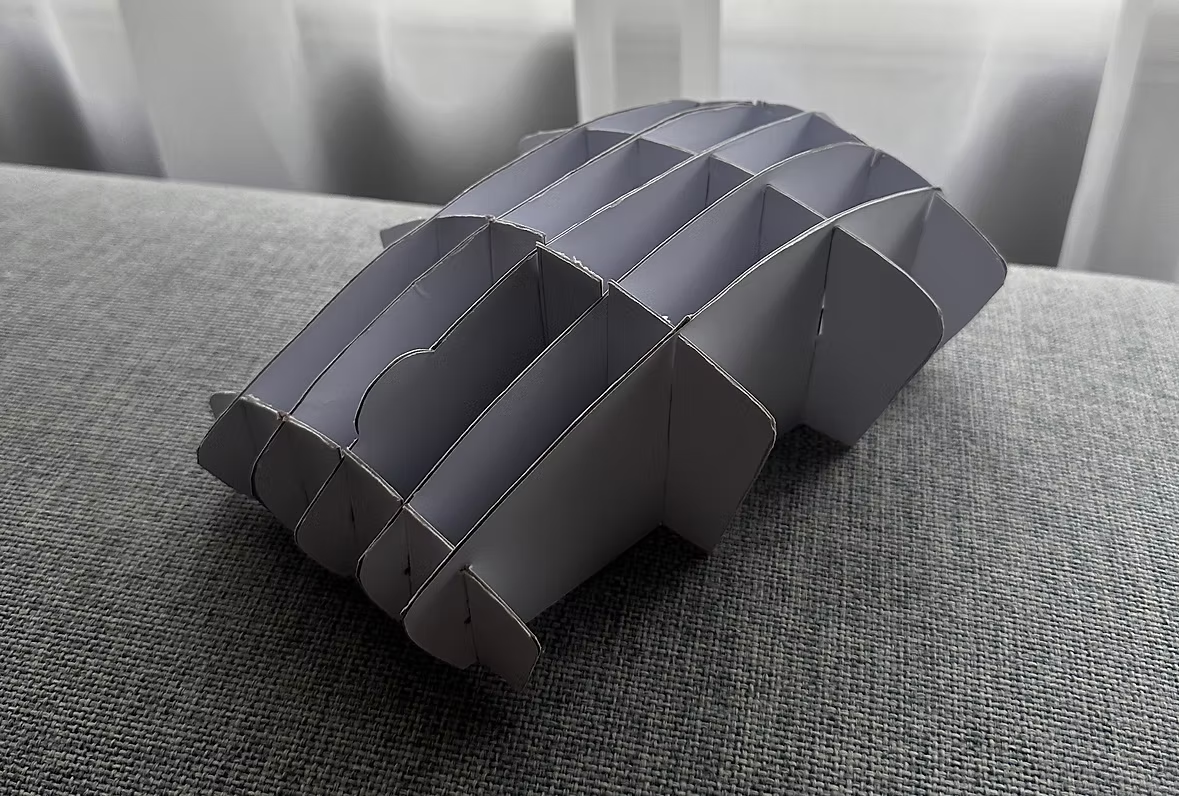
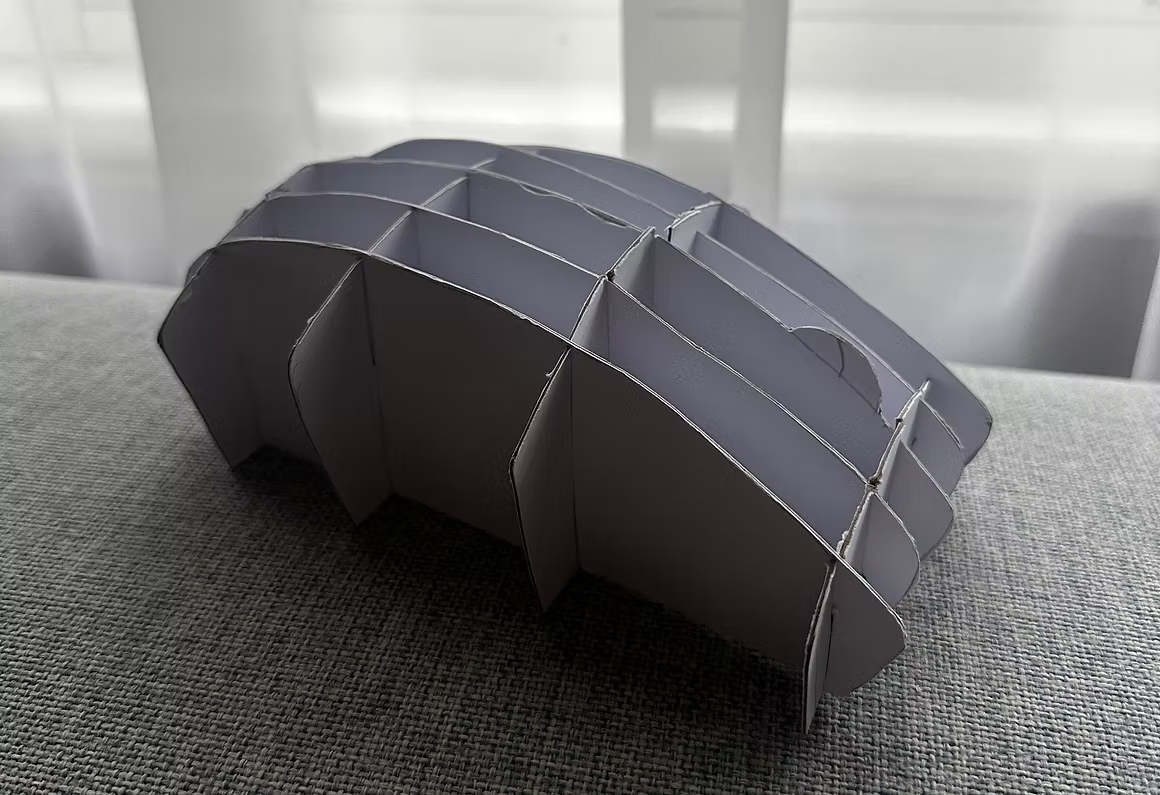
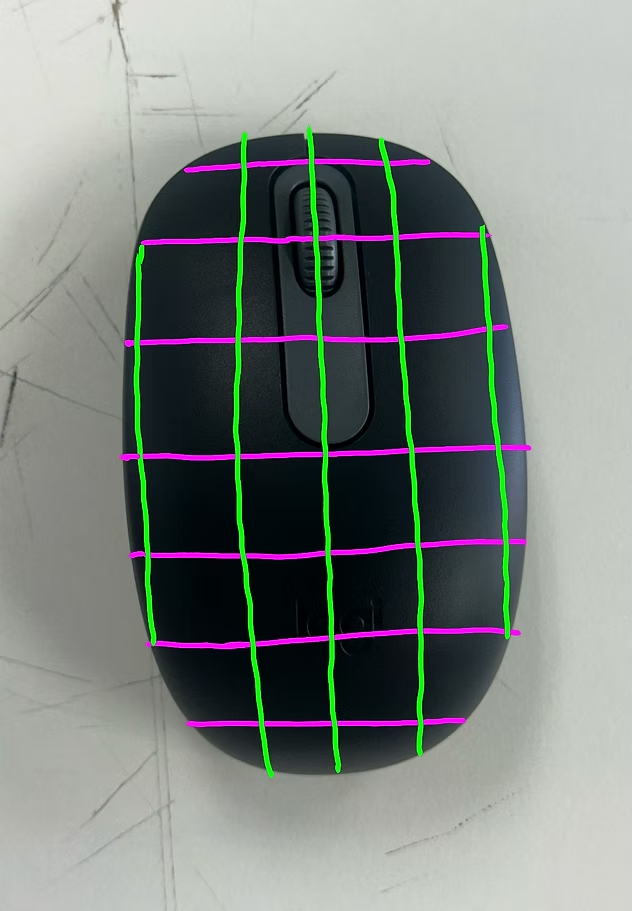
The mouse is another symmetrical object, and when broken down into planes, its hard to develop the 3D complex form.
At each slice of the mouse, there is a different curve, a different apex and different width, this makes it hard to represent in planar slices.
However once sliced, there is a complex form generated only using planes. From the front, the angles and curves are evident which shows the complex geometry. From the side, the large bump and unique scroll wheel is evident which truly alarms the viewer what the object is.
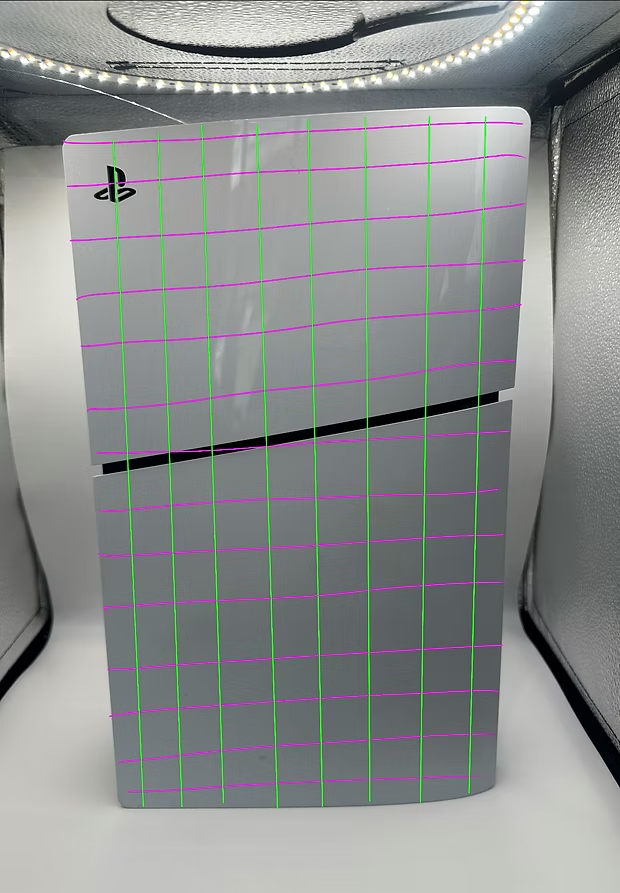
The playstation is built from a complex organic form that captures movement along all three axis. Capturing this in planar form is complex like the mouse, the planes have to be curved along each of the axis making them hard to join together in 3D space.
I opted to removing the disc drive which helps the object become symmetrical and more balanced. This helps my understanding for how the planes can look from the front view.
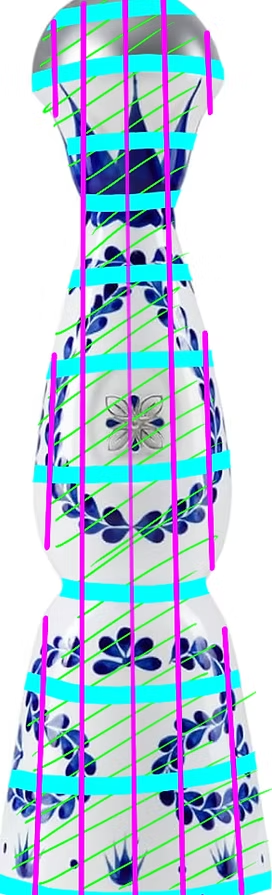
The tall volume and organic profile of this object is great to display in planar form.
Adding planes at any point allows for a unique diameter circular plane to be produced. When applying planes I utilised even spacing capturing various different widths planes which capture the organic movement of the bottle's silhouette.
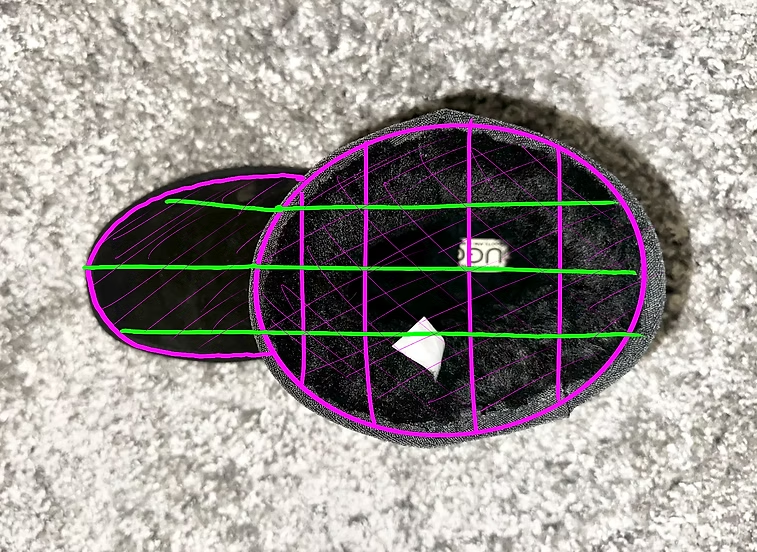
The ugg boot being a 'symmetrical' objects makes it easy to be broken down into planes.
The symmetry is highlighted from its birds eye view where the planes show a cylindrical and circular combined form.
Utilising a side on plane that takes the shape of the silhouette gives the viewer an initial reference to what the object is. Utilising horizontal planes helps give the depth, and utilising curved edges to the planes shows the object has a cylindrical volume which you could see when viewing the planes from above.
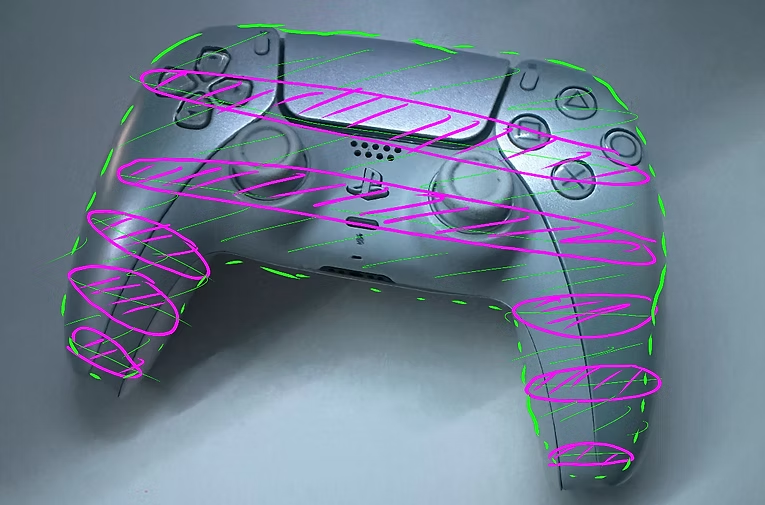
This object does not convey strong principle when constructed in planar form. The emphasis on its body and linework comes from its organic form and separation for components which cannot be recognised within planes. However its strong silhouette can be evident and emphasised from a birds eye view.
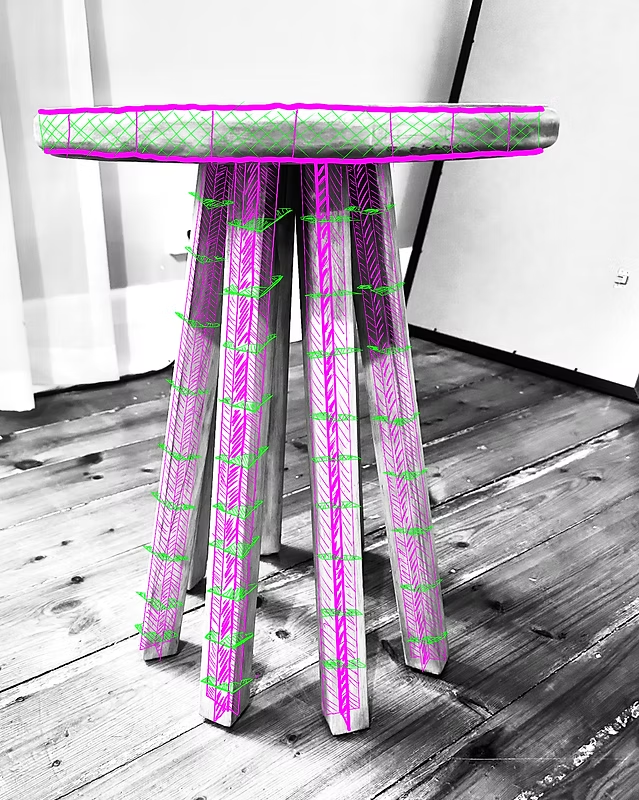
The side table was different to explore compared to the rest of the objects as it has a very simple and straight geometry, non organic compared to the rest. This made viewing it in planar simple, as the top is two simple round circles joined with cross bracing inside.
The legs are a cross of two planes joined with horizontal parallel planes to show the depth and volumetric 3D profile of the legs. Its simplicity was a good option to explore how planes can work in non organic forms.
Volume Study
Using the same 6 objects of my choice, I dissected them down to how they could be made up only using basic geometric 3D shapes.
In addition, I produced the Mouse as a real life model using foam. The model was produced by individually making each 3D shape, then glueing them together to build a form that represents the object. I ensured that each shape was basic as the goal is to produce representations and not replicas, hence there were minimal curved surfaces and bevels to the primitive 3D shapes.
This study helped my understand how every object has its primitive form and can be polished using techniques I learnt later such as transitions and interrelationships. Expressing primitive form is important as it allows me to first understand what form and volume this object will take up in an environment before refining.
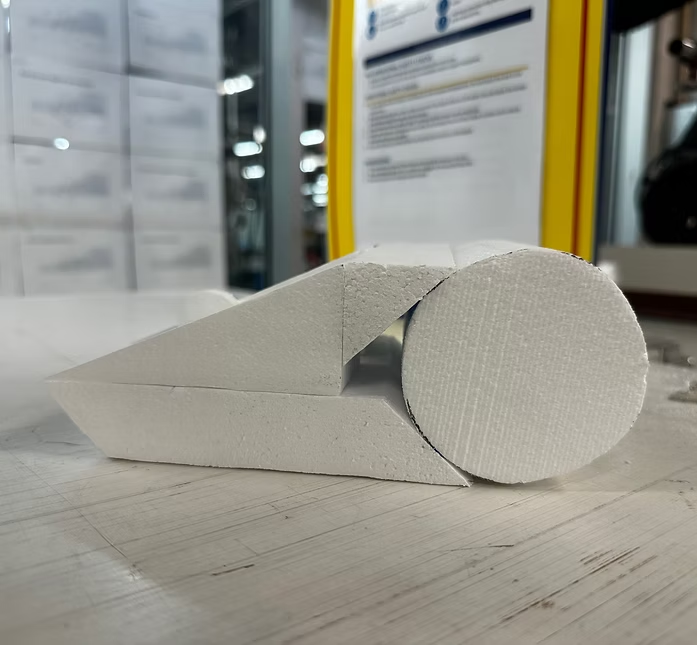
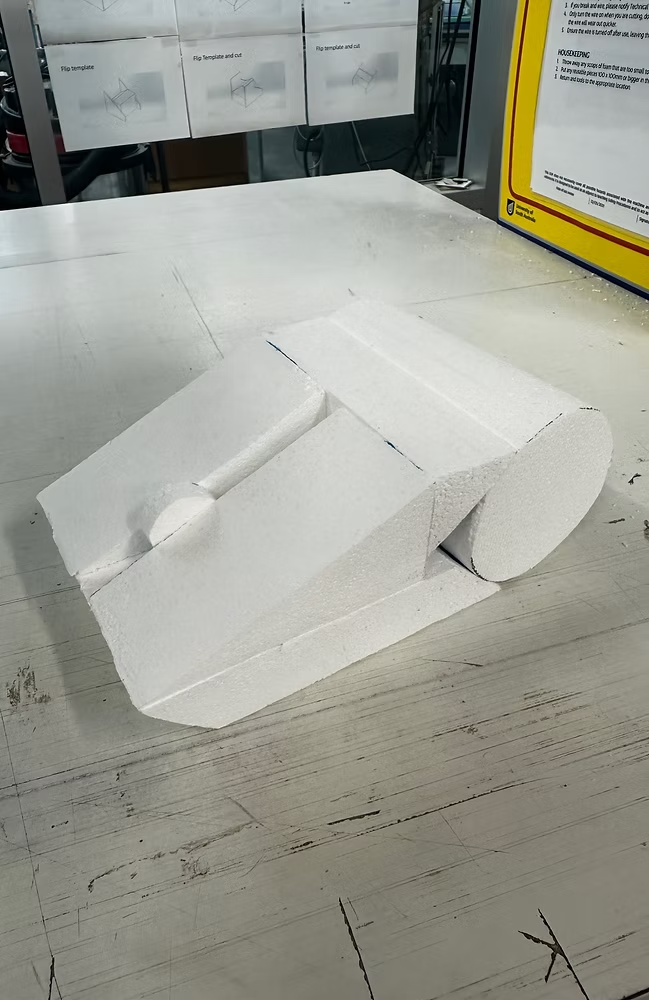
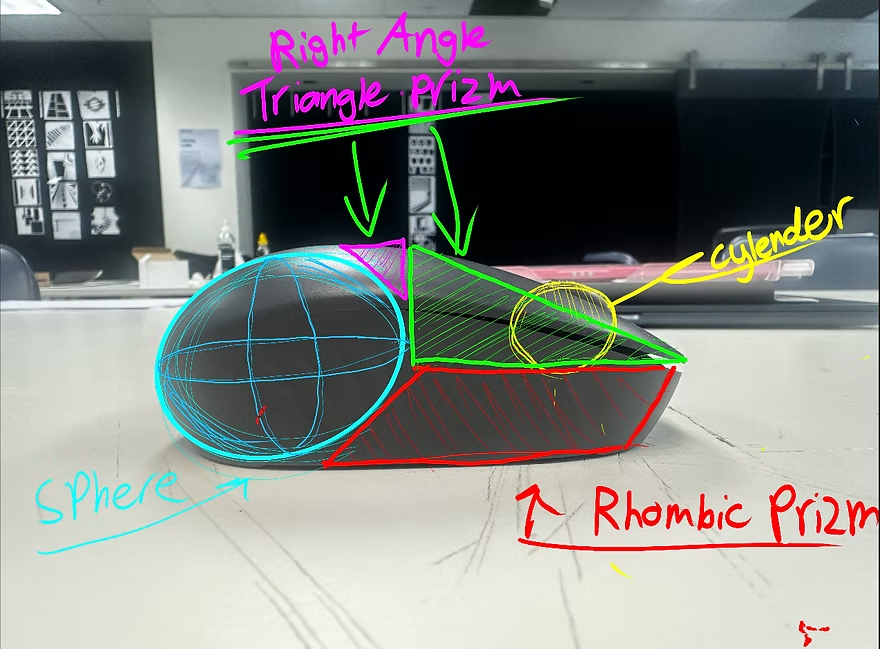
Being such a small and low volume object, it is thought that it can't have very many 3D shapes that build up its form. However upon dissecting this model, i found that i could replicate most of the curves and angles using semi-primitive 3D shapes such as rhombic prisms and right-angled-triangle prisms. This strategy helped me build a complex model with various shapes but also showing a silhouette, a complex form, and not overdoing it with features such as bevels and fillets which helps not turn it into a recreation.
When creating it in real life using foam, it was evident that the sphere wasn't unified with the rest of the model due to being widely elongated. Hence I opted to using a cylinder to help fill in the gaps and unify with the elongated cohesive shapes.
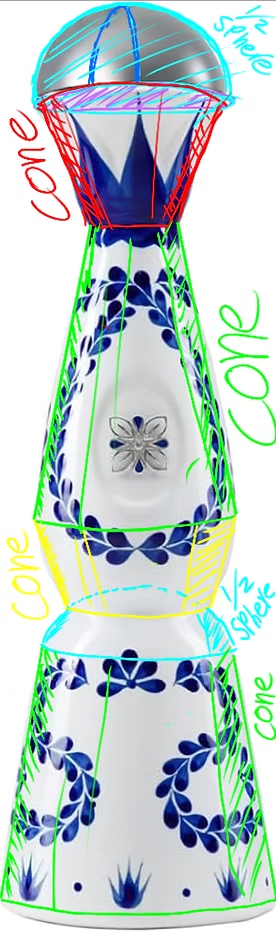
This form is again one that's great to represent in simple 3D geometry. Although the model is multiple cones stacked, this helps show that in products, they can be so simple but have such a distinguishable form. Not many objects take up a multiple in and out curved silhouette, but when it does, it expresses great movement within the form. Additionally, it's a very harmonious object, having a greater bolder cone at the base, thinner cones moving towards the top and capped off with a bold symmetrical half sphere.
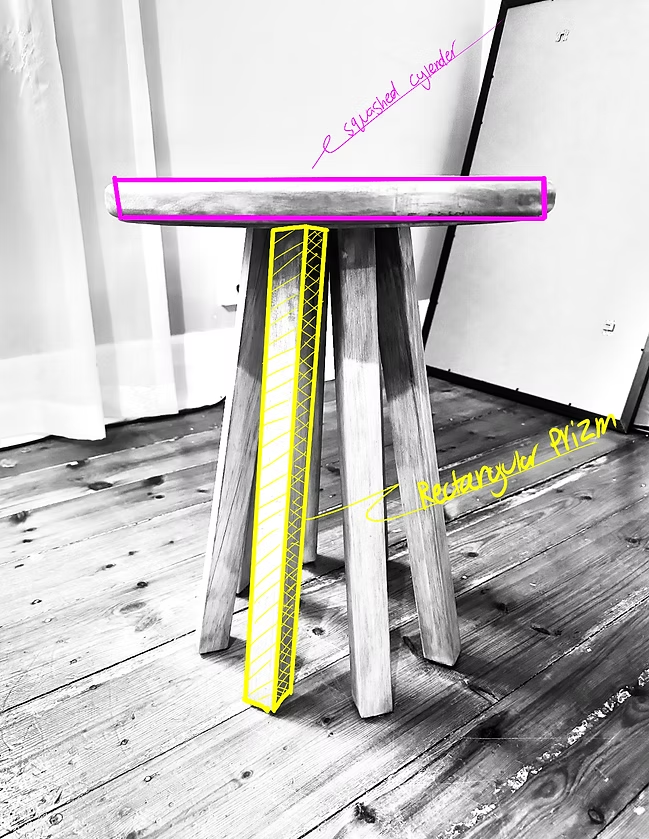
This product is a low complexity form when it comes to volume, only being made up of two diverse 3D forms. However the legs are made up of repetition of one rectangular prism.
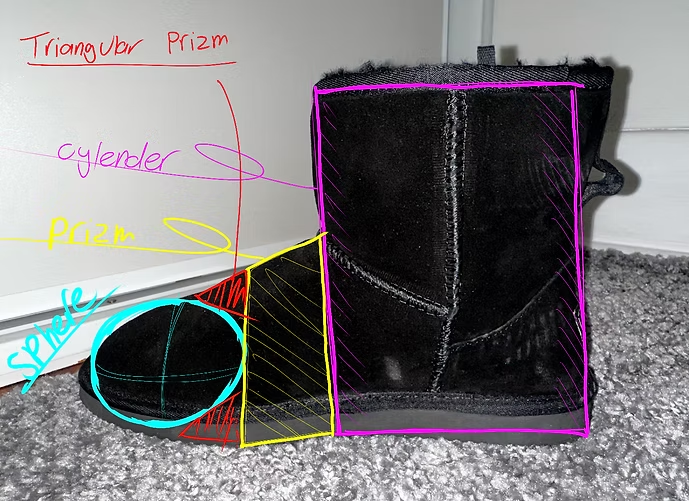
The ugg boot is comprised with primitive shapes like the mouse. Utilising triangular prisms to lock in the sphere on the front of the foot. The most recognisable shape when looking at the object is the large cylinder that makes up the opening around the ankle.
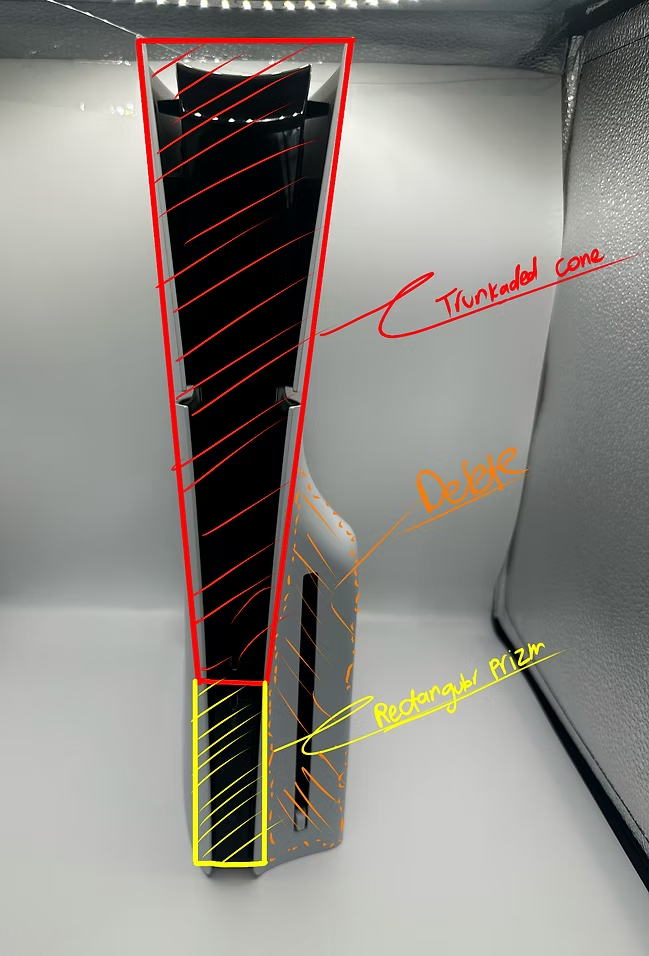
This model has one of the most complex forms out of all 6 products. Its curvature happens on all axis hence making it hard to represent without replicating. Knowing this, a replication using primitive shapes doesn't work as well, due to most of its complexity being locked behind a replication. Therefore, the model lacks complexity and is built using two very simple shapes. This is one of the more weak models to be replicated in primitive 3D form thus having the most sophisticated and unique form.
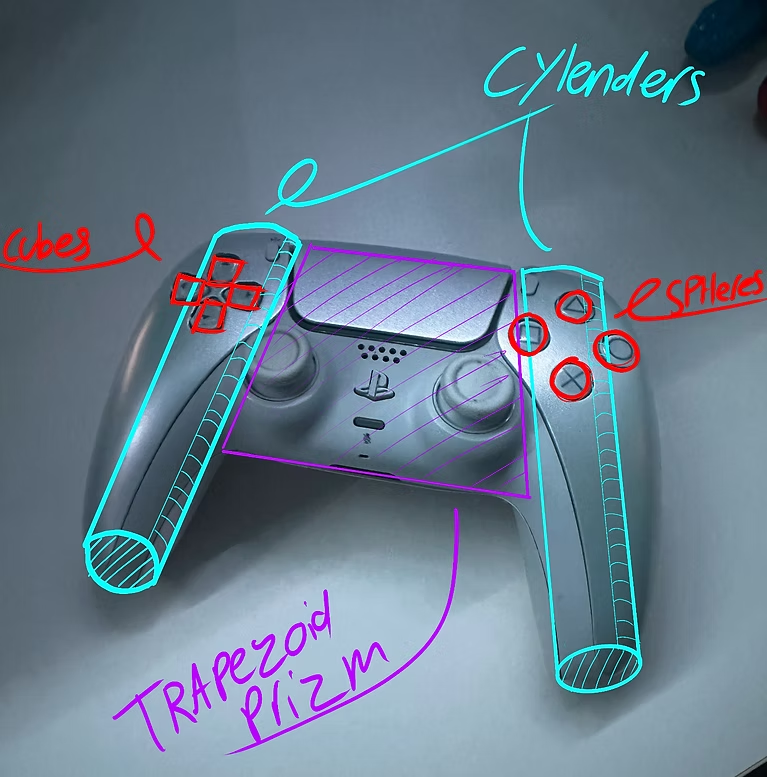
Similar to its planar model, its form can not be strongly recognised within simple geometric shapes. Due to its organic composition, angular and simplicity does not convey the original intentions of the product.
However a simple game controller mimicking most models produced globally and from multiple eras, it could be seen as a console controller.